Howdy!
As a vocal supporter of Discourse I thought I’d chime in with a short introduction on writing and using the system. (I just checked and I’ve been administering a Discourse instance for 10 years, which is weird because I just set it up a couple of years ago, right?!  ).
).
Introduction
Discourse is a modern forum built for better discussions and interactions.
It provides many features to help facilitate easier communication and to foster better discussions. I wanted to try and cover some of the basics of writing in Markdown, which is just a simple way to enable basic formatting in pure text documents and has become the lingua franca of the modern web.
Formatting Posts
The primary interface for writing posts on the site use the Post Editor that looks like this:
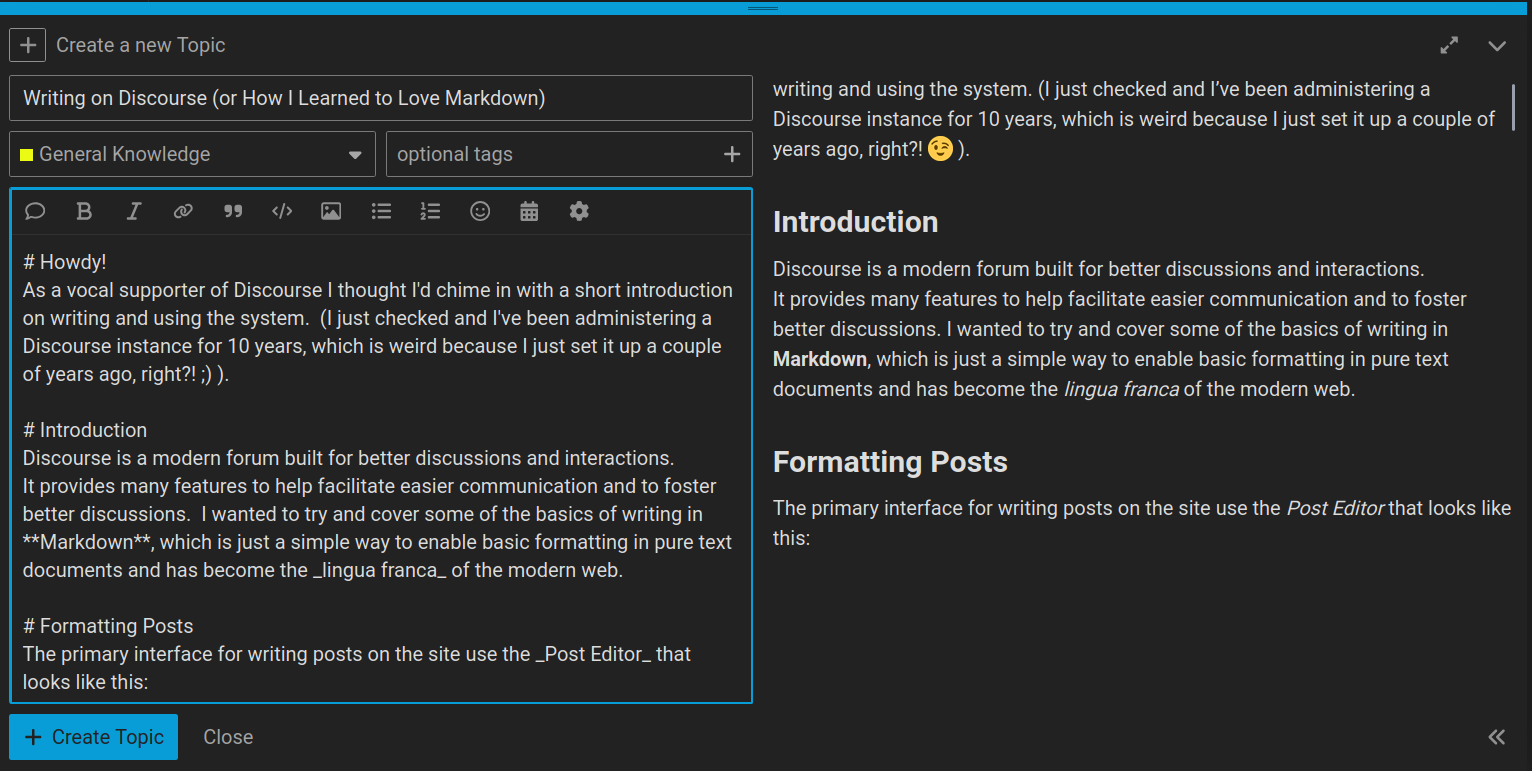
If you want to use the buttons for formatting your posts they are arranged along the top of the post text editor window and are:
- Quote
- Bold
- Italic
- Hyperlink
- Blockquote
- Pre-formatted text
- Upload a file or image
- Bulleted List
- Numbered List
- Emoji
- Insert date/time
- Options
Don’t let all of these options overwhelm you. Usually you’ll likely only use a few common ones like Bold, Italic, Hyperlink, Image upload.
Posts written in Discourse use CommonMark*, a lightweight markup language often used on the web.
* itself an extension of the original Markdown by John Gruber and Aaron Swartz
There are only a small handful of markup methods to format your posts with the most common formatting options. When in doubt, refer to the CommonMark reference:
Cheat Sheet
A quick cheatsheet of the most commonly used markdown elements:
| Element | Markdown Syntax |
|---|---|
| Headings | # Heading one## Heading two ### Heading three |
| Bold | **bold text** |
| Italic | *italicized text* |
| Blockquote | > blockquote |
| Ordered List | 1. First2. Second3. Third |
| Unordered List | - First- Second- Third |
| Code | `code` |
| Horizontal Rule | --- |
| Link | [text of link](https://gulfofamericaalliance.org/) |
| Image |  |
Or a slightly more detailed explanation:
Headings
You can divide your post with logical headings by using the hash # at the beginning of a line. The number of hashes defines the heading level:
# Heading one
## Heading two
### Heading three
Styling
To emphasis text with italics you can surround it with one of either underscore _ or asterisk *:
This is _italic_ and so is *this*.
This is italic and so is this.
To make it bold use two underscores __ or two asterisks **:
This is __bold__ and so is **this**.
This is bold and so is this.
Hyperlinks
You can insert a hyperlink by simply pasting a valid URL:
Discourse will turn it into a valid link automatically for you.
If you want different text to be a hyperlink:
[This is a link](https://gulfofamericaalliance.org/)
Images
If you want to include an image in your post, simply drag-and-drop the image file onto the Post Editor.

Alternatively,
If you know the URL for the image, you can also use the CommonMark syntax:

Which will give you:
Lists
Lists can be created using either an asterisk * at the start of a line, or a number followed by a period:
* unordered
* list
* items
- unordered
- list
- items
Or:
1. first
1. second
1. third
- first
- second
- third
(Note the number doesn’t need to be sequential, the numbering is handled for you.)
Mentioning Users (@-mentions)
If you want to get the attention of, or refer to, another user on the forum you can use @ followed by their username (Discourse will provide suggestions based on what you type).
This will trigger a notification to the user that they were mentioned.
Onebox Links
Some sites provide extra metadata when queried as a link that Discourse can pickup and embed directly in your post. For example, when providing a link to a YouTube video the entire video will become embedded in your post automatically:
https://www.youtube.com/watch?v=EVB8ngJswgI

or
https://gulfofamericaalliance.org/
this also works for internal links within Discourse:
https://datamanagers.gulfofamericaalliance.org/t/filling-out-data-management-plans/40/1
Code
You can enter code and keep the formatting from your editor by using triple back-tics ```:
```
{
   "firstName": "John",
   "lastName": "Smith",
   "age": 25
}
```
Which will render like this in the post:
{
   "firstName": "John",
   "lastName": "Smith",
   "age": 25
}
Inline code
You can also surround some text in single-backtics to keep the code inline <kbd>for example</kbd>.
Highlighting Text
You can also highlight text in a post and you’ll be presented with some options that include quoting the highlighted text as part of your response on the topic (which is really handy to keep context, particularly in bigger topics).
Mailing List Mode
If you prefer to continue interacting through a mailing list and the site settings permit it, you can enable Mailing list mode in your account preferences. You’ll receive emails for posts and can email responses that will show up in the topic.
Reach Out
If you have any questions please don’t hesitate to ask - I’ll do my best to answer them as soon as I can. (Remember, you can summon my attention to any topic by @-mentioning me: @patdavid)